
Mybatis
概述
MyBatis是一款优秀的持久层框架,用于简化JDBC的开发。
基本流程
使用Mybatis查询所有用户数据
准备工作(创建springboot工程、数据库表user、实体类User)
引入Mybatis的相关依赖,配置Mybatis(数据库连接信息)
在application.properties中写(其中mybatis是数据库名称,需要根据具体情况进行修改):
1
2
3
4spring.datasource.driver-class-name=com.mysql.cj.jdbc.Driver
spring.datasource.url=jdbc:mysql://localhost:3306/mybatis
spring.datasource.username=root
spring.datasource.password=1234
编写SQL语句(注解/XML)
eg.
1
2
3
4
5
6//在运行时,会自动生成该接口的实现类对象(代理对象),并且将该对象交给IOC容器管理
public interface UserMapper {
//查询全部用户的信息
public List<User> list();
}
单元测试
eg.
1
2
3
4
5
6
7
8
9
10
11
12
13
class SpringBootMybatisQuickstartApplicationTests {
private UserMapper userMapper;
public void test1(){
List<User> userList = userMapper.list();
userList.stream().forEach(user -> {
System.out.println(user);
});
}
}
JDBC
介绍:
JDBC:(Java DataBase Connectivity),就是使用java语言操作关系型数据库的一套API。
本质:
- 一套操作所有关系型数据库的规范,即接口
- 各个数据库厂商去实现这个接口,提供数据库驱动jar包
- 我们可以使用这套接口(JDBC)编程,真正执行的代码是驱动jar包中的实现类
缺点:
- 硬编码
- 繁琐
- 资源浪费,性能降低
数据库连接池
- 数据库连接池是个容器,负责分配、管理数据库连接(Connection)
- 它允许应用程序重复使用一个现有的数据库连接,而不是再重新建立一个
- 释放空闲时间超过最大空闲时间的连接,来避免因为没有释放连接而引起的数据库连接遗漏
优势:
- 资源重用
- 提升系统响应速度
- 避免数据库连接遗漏
标准接口:
- DataSource是官方提供的数据库连接池接口,所有的第三方组织都必须实现此接口
- 功能:获取连接(Connection getConnection() throws SQLException;)
Lombok
是一个实用的Java类库,能通过注解的形式自动生成构造器、getter/setter、equals、hashcode、toString等方法,并可以自动化生成日志变量,简化java开发、提高效率。
| 注解 | 作用 |
|---|---|
| @Getter/@Setter | 为所有的属性提供get/set方法 |
| @ToString | 会给类自动生成易阅读的toSring方法 |
| @EqualsAndHashCode | 根据类所拥有的非静态字段自动重写equals方法和hashCode方法 |
| @Data | 提供了更综合的生成代码功能(@Getter+@Setter+@ToString+@EqualsAndHashCode) |
| @NoArgsConstructor | 为实体类生成无参的构造器方法 |
| @AllArgsConstructor | 为实体类生成除了static修饰的字段之外带有各参数的构造器方法 |
Lombok会在编译时,自动生成对应的java代码
具体流程
准备工作
- 准备数据库表emp
- 创建一个新的springboot工程,选择引入对应的起步依赖(mybatis、mysql驱动、lombok)
- application.properties中引入数据库连接信息
- 创建对应的实体类Emp(实体类属性采用驼峰命名)
- 准备Mapper接口—EmpMapper
删除员工
根据主键删除
- SQL语句:
1 | delete from emp where id = 17; |
- 接口方法:
1 |
|
注意:如果mapper接口方法形参只有一个普通类型的参数,#{…}里面的属性名可以随便写,如:#{id}、#{value}。
预编译SQL
优势:
性能更高
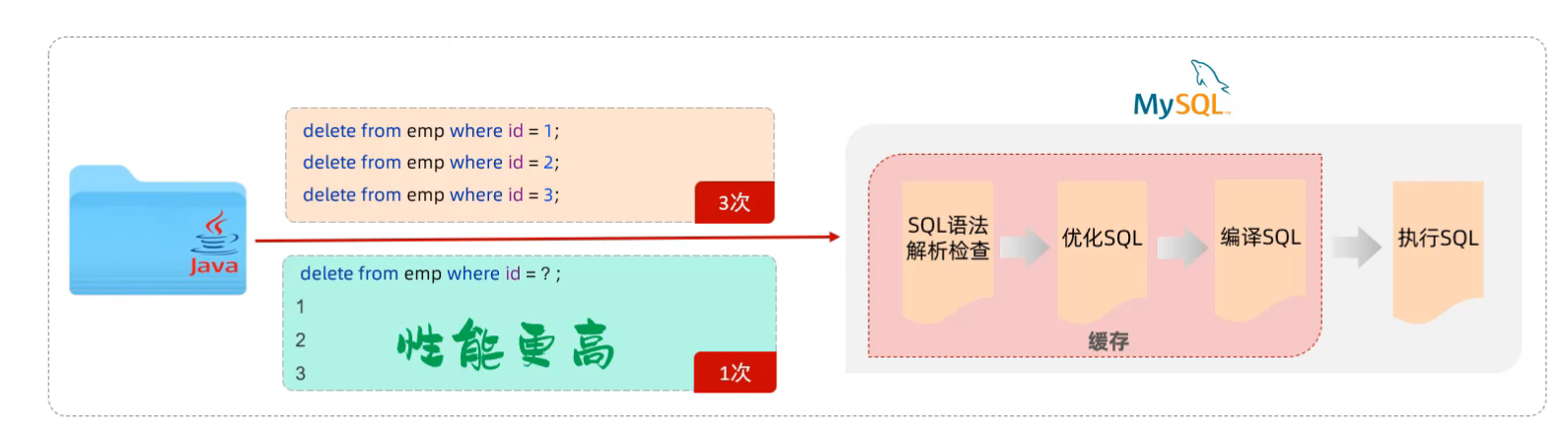
更安全(防止SQL注入)
SQL注入:通过操作输入的数据来修改事先定义好的SQL语句,以达到执行代码对服务器进行攻击的方法。
参数占位符:
- #{…}
- 执行SQL时,会将#{…}替换为?,生成预编译SQL,会自动设置参数值
- 使用时机:参数传递
- ${…}
- 拼接SQL,直接将参数拼接在SQL语句中,存在SQL注入问题
- 使用时机:如果对表名、列表进行动态设置时使用
新增员工
- SQL语句:
1 | insert into emp(username, name, gender, image, job, entrydate, dept_id,create_time, update_time) values('songyuanqiao', '宋远桥', 1, '1.jpg', 2, '2012-10-01 10:00:00', '2022-10-01 10:00:00'); |
- 接口方法:
1 |
|
主键返回
描述:在数据添加成功后,需要获取插入数据库数据的主键。如:添加套餐数据时,还需要维护套餐菜品关系表数据。
实现:
1 |
|
会自动将生成的主键值赋值给emp对象的id属性
更新
与新增员工时类似
SQL语句:update update set …,… where id = 19;
接口方法:@Update(“……”)
查询(根据ID)
- SQL语句:
1 | select * from emp where id = 17; |
- 接口方法:
1 |
|
但是发现返回的部分属性值为null
数据封装:
- 实体类属性名与数据库表查询返回的字段名一致,mybatis会自动封装
- 如果不一致,不能自动封装
解决方案:
- 方案一:给字段起别名,让别名与实体类属性一致
1 |
|
- 方案二:通过@Results,@Result注解手动映射封装
1 |
|
- 方案三:在application.properties中开启驼峰命名自动映射开关(推荐)
1 | mybatis.configuration.map-underscore-camel-case=true |
查询(条件查询)
- SQL语句:
1 | select * from emp where name like '%张%'and gender = 1 and entrydate between '2010-01-01' and '2020-01-01' order by update_time desc; |
- 接口方法:
1 |
|
由于预编译的?占位符不能出现在引号内,所有需要用$占位符。但是这样性能低,不安全,存在SQL注入问题。
改进方案:通过tomcat进行字符串拼接
1 |
|
参数说明
eg. 在String name前可加上@Param(“name”),从而能够与注解中使用的参数一致
但是在springboot2.x版本内置了编译插件,可以省略这一部分。
XML映射文件
规范
- XML映射文件的名称与Mapper接口名称一致,并且将XML映射文件和Mapper接口放置在相同包下(同包同名)
- XML映射文件的namespace属性为Mapper接口全限定名一致
- XML映射文件中sql语句的id与Mapper接口中的方法名一致,并保持返回类型一致
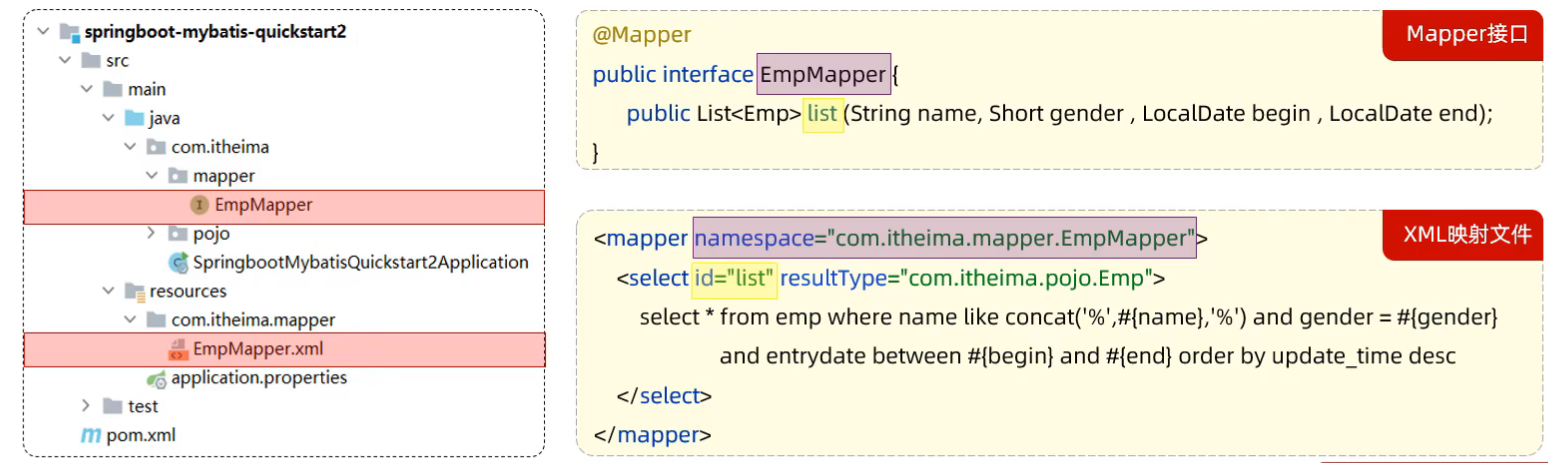
resultType:单条记录所封装的类型
区别
使用Mybatis的注解,主要是来完成一些简单的增删改查功能;如果需要实现复杂的SQL功能,建议使用XML来配置映射语句。
动态SQL
动态SQL:随着用户的输入或外部条件的变化而变化的SQL语句(一般用XML文件来定义)
<if>
- <if>:用于判断条件是否成立,使用test属性进行条件判断,如果为true,则拼接SQL。
- **<where>**:只有内部包含的子元素存在true时才会插入where,并且能够自动去除子句开头的AND或OR。
eg.
1 | <select id="list" resultType="com.itheima.pojo.Emp"> |
- **<set>**:动态地在行首插入SET关键字,并会删掉额外的逗号。(用在update语句中)
<foreach>
SQL语句:
1
delete from emp where id in (1,2,3);
接口方法:
1
2//批量删除
public void deleteByIds(List<Integer> ids);XML映射文件:
1
2
3
4
5
6<delete id="deleteByIds">
delete from emp where id in
<foreach collection="ids" item="id" separator="," open="(" close=")">
#{id}
</foreach>
</delete>- collection:集合名称
- item:集合遍历出来的元素
- separator:每一次遍历使用的分隔符
- open:遍历开始前拼接的片段
- close:遍历结束后拼接的片段
<sql>和<include>
- **<sql>**:定义可重用的SQL片段
- **<include>**:通过属性refid,指定包含的sql片段
二者配对使用,将多次使用到的部分包装起来,减少代码量
eg.
1 | <sql id="commonSelect"> |